Pine script om trend te bepalen op 3 timeframes.
🔧 Tools & Exchanges78 keer bekeken

Gunther_VDStartbericht ·
Ik heb een indicator gebruikt van iemand anders. deze aangepast om te voldoen aan de CC swingtrade 1.5 strategie. De pijltjes zijn niet 100% accuraat volgens hoe het is uitgelegd maar wel een goede indicatie.
//@version=6
indicator("CC Swing 1.5", overlay=true)

// --- Style Settings ---
color_bull = color.new(#10b981, 0) // Emerald Green
color_bear = color.new(#f43f5e, 0) // Rose Red
color_neut = color.new(#94a3b8, 0) // Slate Grey

// --- Trend Calculation Function ---
get_trend(tf) =>
    // We use [1] to look at the last COMPLETED candle of that timeframe
    // This stops the 2m chart from flickering the 4H and 1H results
    t_close = request.security(syminfo.tickerid, tf, close[1])
    t_ema   = request.security(syminfo.tickerid, tf, ta.ema(close, 20)[1])
    t_high  = request.security(syminfo.tickerid, tf, ta.highest(high, 5)[2])
    t_low   = request.security(syminfo.tickerid, tf, ta.lowest(low, 5)[2])

    // Check slope of the EMA from the previous confirmed state
    t_ema_prev = request.security(syminfo.tickerid, tf, ta.ema(close, 20)[2])

    string arr = "—"
    color  col = color_neut

    // Bullish: Confirmed close above confirmed EMA + Structure or Slope
    if t_close > t_ema and (t_close > t_high or t_ema > t_ema_prev)
        arr := "▲"
        col := color_bull
    // Bearish: Confirmed close below confirmed EMA + Structure or Slope
    else if t_close < t_ema and (t_close < t_low or t_ema < t_ema_prev)
        arr := "▼"
        col := color_bear

    [arr, col]

// --- Fetch Trends for Specific Timeframes ---
[t1d_arr, t1d_col] = get_trend("1440") // 1 Day
[t4_arr, t4_col]   = get_trend("240") // 4 Hour
[t1_arr, t1_col]   = get_trend("60")  // 1 Hour

// --- Dashboard Table Setup (Bottom Right) ---
var table trend_box = table.new(position.bottom_right, 2, 4, border_width = 1, frame_color = color.gray)

if barstate.islast
    // Table Headers
    table.cell(trend_box, 0, 0, "TF", text_color = color.white, bgcolor = color.black, text_size = size.small)
    table.cell(trend_box, 1, 0, "TREND",     text_color = color.white, bgcolor = color.black, text_size = size.small)

   // 1 Day Row
    table.cell(trend_box, 0, 1, "1D",    text_color = color.white, bgcolor = color.new(#2a2e39, 0), text_size = size.small)
    table.cell(trend_box, 1, 1, t1d_arr,      text_color = color.white, bgcolor = t1d_col, text_size = size.small)

    // 4 Hour Row
    table.cell(trend_box, 0, 2, "4H",    text_color = color.white, bgcolor = color.new(#2a2e39, 0), text_size = size.small)
    table.cell(trend_box, 1, 2, t4_arr,      text_color = color.white, bgcolor = t4_col, text_size = size.small)

    // 1 Hour Row
    table.cell(trend_box, 0, 3, "1H",    text_color = color.white, bgcolor = color.new(#2a2e39, 0), text_size = size.small)
    table.cell(trend_box, 1, 3, t1_arr,      text_color = color.white, bgcolor = t1_col, text_size = size.small)
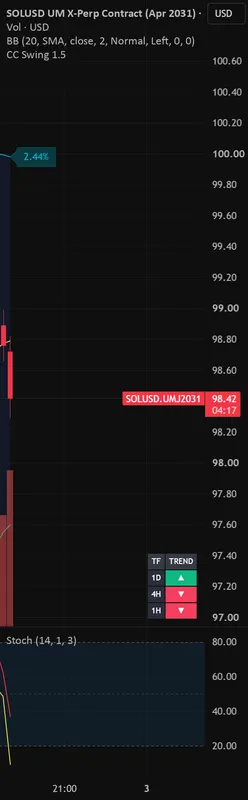 tradingview.comCC Swing 1.5 — Indicator by gunther_v_dDit script heb ik geleend van iemand anders Ik heb deze lichtjes aangepast om te voldoen aan de CC Swingtrade 1.5 De trends zijn niet 100% accuraat zoals uigelegd in de strategie maar het is een goede indicatie. Check zelf nog even als de pijltjes goed staan.
Vind ik nuttig1
Bewerkt op 3 september 2026